Showing posts with label how to make account. Show all posts

Monday, 2 March 2020

Photopea a Free Photoshop | Web Based Free Photoshop App - HOO FREE


Photopea a Free Photoshop |Web Based App


Photopea


Features That Might You Like


OS - It Supports Every OS

Category - Web Based App

Run On - Any Browser

Supported Files - Psd,Jpg,Png,Gif,Svg, And More

Exportable Files - Psd,Jpg,Png,Gif,Svg, And More

Traffic - 20k

Earning - Through Donations

License - Free

Premium Membership - Available

Developed By - Photopea

Language - English

Rating - 3/5

version - 1.0

Similar To -  Adobe Photoshop (But Photopea is free)

URL - photopea.com 

Themes - Black,Silver,Iron Blue,Snow white,Denis purple.

Short Info - It is a online Photo Editor Like Adobe Photoshop And it is Free .You can do any thing you that you do in Adobe Photoshop.


Photopea An Online Free Photoshop Website


About Photopea

Photopea is a free multimedia software for editing files from native apps. Opening special files can take too much time when it comes to tweaking even the most minor errors. The image editor software allows a more convenient graphic designing since it’s operational at web browsers. Users can edit their images in a lighter environment compared to waiting for an image editor application to load its assets. The source code of this image editor software is available at their official GitHub website. Users can contribute to the development of Photopea by providing codes, as well as purchase the premium account.


Watch The Video To Know More About Photopea 


Good & Bad

Good

  • Supports Adobe Photoshop, Corel Draw, GNU Gimp, Sketch and Zoner Photo Studio files
  • A photo editor for specific native apps
  • Support PNG, JPG, SVG, GIF and PDF export formats
  • Edit photos easily on web browser
  • Free


Bad

  • May lack support for other image editor format
  • More features available at premium account
  • May lack some powerful image editing tools
  • Takes time to be familiar with the interface


Look's


Monday, 16 September 2019

How to make High Quality Backlinks|what is Backlinks|How to Create backlinks|Linkcollider backlinks

How to make High Quality Backlinks|what is  Backlinks|

How to Create backlinks|Linkcollider backlinks


How to make High Quality Backlinks
Backlinks


About Backlinks:- (what are backlinks)

Backlinks are the links which is created to support other sites.
 Backlinks are created when one website links to other website. Backlinks, also called "inbound links" or "incoming links".

Types of Backlinks:-
  • Good
  • Bad 
  • Poor


Backlinks


What is the importance of Backlinks in search engine optimization (SEO) :-


Backlinks are very important for SEO reason. Backlinks give you a high value in front of any other website.Mainly Backlinks increases your sites value in SEO .It increases you SEO because the Backlinks is made by other website owner who's site is getting more visitors and also he's site is valuable if you get a Backlink so you site ranking will increase automatically.


Backlinks for traffic:-

Backlinks helps in SEO and it also helps in increasing traffic on your website or blog post.
If someone gives your sites link on his blog then any if reads the blog and he will sees you sites link on the blog, 100% chances that he will visit you site once.
so by using Backlinks you can high you site in SEO appearance.

Earn through link building:-

People also earn through link building.it means that if you site more valuable than other site then you will  get more request for making backlinks for other site,at this time some people 
charge a high amount for the backlink. so that's why it is very expensive.only big site owner can afford this things.and small site owner or bloggers get natural backlinks.
people give natural backlinks because they liked their work.

Blog:-
----------------------------- What we learn in this post ------------------------------
  • Here we learn how to create a high quality Backlinks which is totally free !, no cost !
  • And we also know some free backlink Generators and free backlink checkers.
  • some suggestions for best backlinks.

------------------------------ How to Create backlinks: ---------------------------------
  • Fake Free Backlink Generators:-
If you Search on Google Free Backlink Generators than you can get many results that are showing Free Backlink Generators But in realty these all are fake. You can try !


search for backlink generators
a search for backlink generators


  • Steps:-

  1. Click on the first link     ( smallseotools.com )
  2. Look for URL box and fill it.
  3. Click on Make Backlink button and DONE!
    URL box of smallseotools

After doing all the stuff you will see some processing backlinks

processing backlinks on  smallseotools


Now you have created backlinks.After some time if you check your backlinks
you find nothing.
To check the backlinks you can use :-----
Note!!:-
These tools not snow you all backlinks. Because it is free plan.If you want to see all 
backlinks and other thing you need to purchase their paid membership.or you can enjoy the tool in free plan.

------------------------- HOW TO MAKE FREE BACKLINKS : -------------------------

Now we will learn how to create new and high quality backlinks #free
In this all process we will use Linkcollider Free Backlink Generator.
If you don't know about Linkcollider you can see our blog on Linkcollider it will help you to understand better.Blog on Linkcollider

Steps to Create Backlinks:-


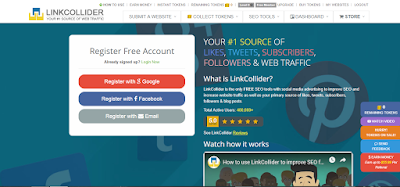
     logo of linkcollider

    • Make you account on Linkcollider,it is very easy you just need a e-mail ID only.And you account is ready! (very easy)

    /OR


    • Now that you Linkcollider account is ready click at Backlink Generator on SEO Tool option on the top.

    SEO Tool option on linkcollider
    ---- SEO Tool option ---


  1. You will see a box for Backlinks Which is asking you site for Backlinks choose your site           and click on Next button.


    • site selection box for backlinks


      • You will see a box for Backlinks Which is asking you site for Backlinks choose your site and click on Next button.
      • Now you see box for numbers backlinks that you need choose it. Note! that 1 Backlink is for 150 tokens .


    • Problem - If you don't have any tokens don't worry😉you can earn it.
      • Ways to earn Token Free you can watch some site on linkcollider then you can earn low token for high tokens you  need to like someones post or you can subscribe it then you can earn high amount of tokens.
      • in my opinion you should use autosuf option on Linkcollider's collect Tokens option
        How to earn collect Tokens on  Linkcollider


      • Now you see box for numbers backlinks that you need choose it. Note! that 1 Backlink is for 150 tokens .
      • When you have Tokens then you can complete you backlink process.
      shown in Below images:-


       backlink process|backlink creation steps


      To Know More About Backlinks watch This video ↴ 

      Backlink Help


      Now you learn how to create #free Backlinks

      you can check you Backlinks at

      smallseotools backlink checker.
      Ahrefs backlink checker

      Note!:- Check your Backlinks on above site after some days.Because these site take time to optimize you Backlinks.
      What you gain on this blog****Tech on Mobiles****

      How to create Backlinks


      Use of Linkcollider SEO Tools

      Use of Smallseotools Backlink checker

      Use of Ahrefs Backlink checker
      AND /
      a great concentration


      famous search on google(this Blog)-

      backlinks

      backlink checker

      backlinks in seo

      backlinks meaning

      backlink generator

      backlink blog

      backlinks maker free 

      backlinks submission sites

      backlinks ahrefs

      and more...

      Our readers review on this blog- 

      rating-★★ 

      (the rating is done though e-mail.)
      you can also rate us on comment box ⬎

      BYE , catch you later

                                                        Powered by-www.techspot2019.blogspot.com


      OUR OTHER BLOGS

      HOW TO MAKE AN ACCOUNT ON LINKCOLLIDER.COM


      HOW TO MAKE AN ACCOUNT ON LINKCOLLIDER.COM


      LINKCOLLIDER SEO TOOL

      Reasons to use linkcollider


      Reasons to use linkcollider

      Best LINKCOLLIDER seo tools


      Linkcollider logo

      Affiliate Program of LinkCollider


      Affiliate Program of LinkCollider


      TOP 5 FREE SEO TOOLS WEBSITES in 2019


      Asus ROG Strix Core i7 8th Gen

      Asus ROG Strix Core i7 8th Gen- front look

      ASUS ROG SERIES


      HOME-techspot2019.blogspot.com

      Keep loving our blogs


      Thursday, 30 May 2019

      How to make an account on linkcollider.com|four steps to make an account on linkcolider.com|4 easy steps to make an account on linkcolider.com|linkcolider.com|linkcolider seo tools account


      How to make an account on linkcollider.com


      #step 1 

      Go to linkcollider.com


      #step 2


       select e-mail method 

      #step 3

      Fill you details like nickname,e-mail address.,Password, Confirm Password and recaptcha.


      #step 4

      click on Register

      Now your account is ready😊

      These are the steps that how can you make you account on linkcolider.com 


      our other blogs- OnePlus 7 Pro